Cordless vacuum maintenance: filter, brush bars, bin and battery
A well-maintained stick vacuum keeps its suction, does not smell and lasts for years. All it takes is a few regular habits: empty the bin, wash the filter, untangle the brush bar, check the wand. Here is the complete method, the schedule and the solutions to common faults.
Contents
Why maintenance changes everything
A stick vacuum works thanks to a flow of air. Anything that slows that flow reduces suction: an overfilled bin, clogged cyclones, a blocked filter, a partly obstructed wand, a brush bar wrapped in hair. The motor then works harder, the battery runs down faster and the machine heats up. On some models, it starts to pulse or stops to protect itself.
Most “faults” reported by stick vacuum users come down mainly to a lack of maintenance. A filter washed regularly and an untangled brush bar are often enough to restore the original suction. Maintenance is nothing complicated: a few seconds after each session, a few minutes each month.
Important: the advice below is general. Your appliance’s manual is authoritative for your exact model, especially on how often to wash the filter and how to remove the brush bars.
Before any maintenance
- Switch off the machine and take it off the dock.
- Remove the battery before taking a head apart or working on the motor, if your model allows it. On the V15 Detect, the battery unclips.
- Work over a bin or outdoors for dusty jobs.
- Never use detergent on the filter, unless the manual allows it.
- Never get the main body, the battery or the motorised head wet.
Emptying and cleaning the bin
After every session
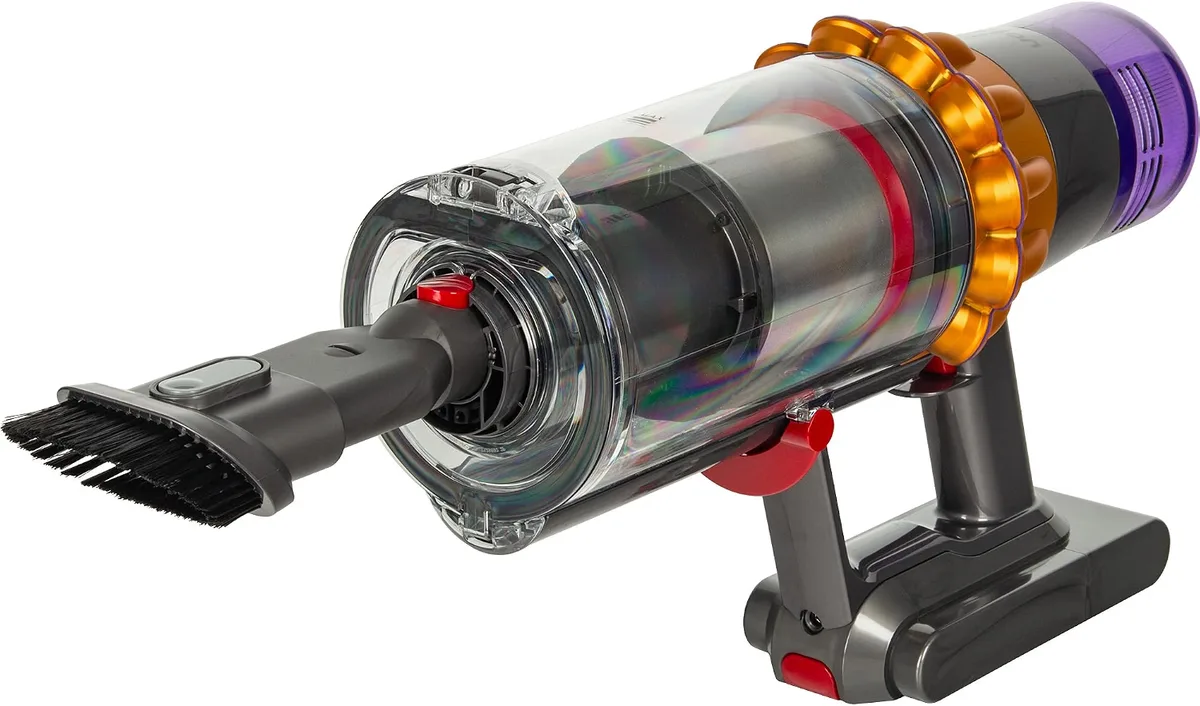
Empty the bin as soon as it reaches the max line, and ideally at the end of every session. A full bin reduces airflow and the effectiveness of the cyclones. On the V15 Detect, whose bin holds 0.76 L according to Dyson, you empty it by pulling the bin down over the rubbish bin: a mechanism pushes the debris out and partly cleans the mesh.
To limit dust, hold the bin inside the rubbish bag before opening it. Allergy sufferers can empty the bin outdoors.
Once a month
Remove the bin as the manual describes. Wipe the inside with a dry or slightly damp cloth, paying particular attention to the seal and the mesh. Some bins can be rinsed with water: check the manual, and let it dry completely before refitting. A damp bin turns dust into paste and causes odours.
The cyclones and the mesh
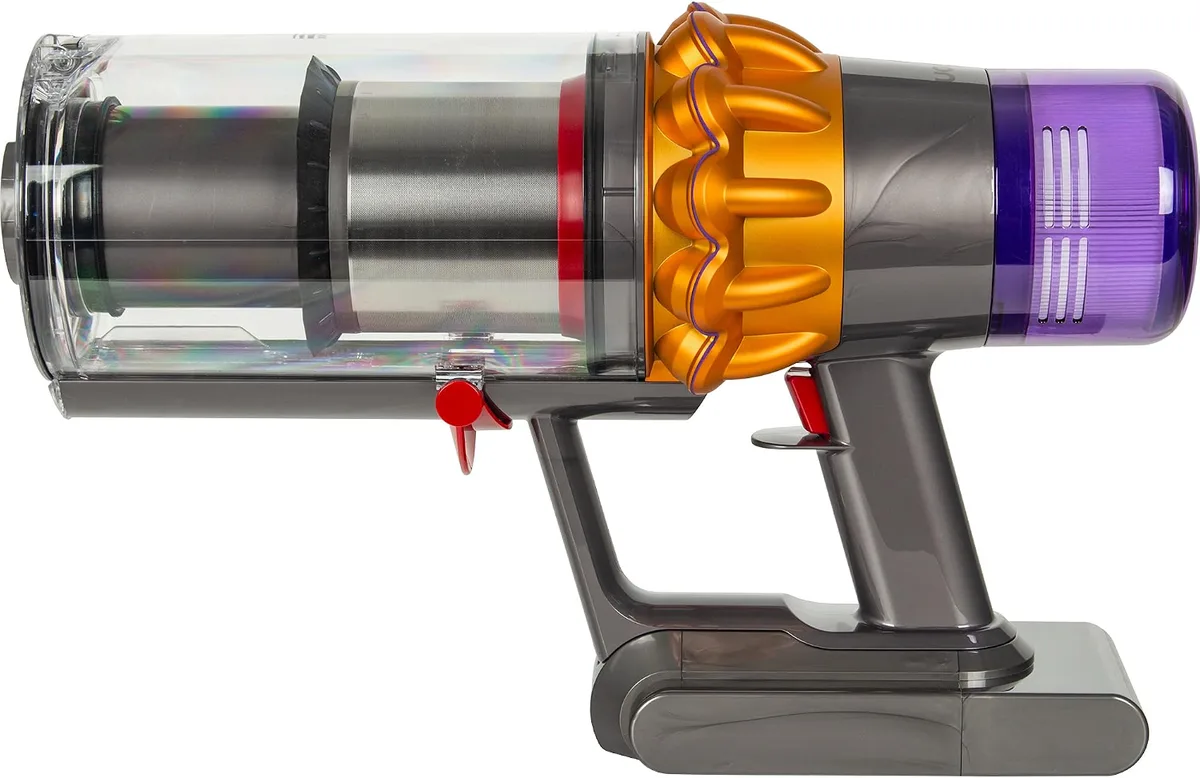
The cyclones separate dust from the air by centrifugal force, before the filter. The V15 Detect has 14 of them, according to Dyson. Over time, a fine layer of dust builds up inside them, especially if you vacuum a lot of fine dust or hair.
Inspect them once a month. A dry soft-bristle brush or a paintbrush removes visible dust from the mesh and the cyclone inlets. Do not wet them, unless the manual says otherwise, and do not push sharp objects into the openings.
Washing the filter
The filter traps the finest particles that the cyclones have not separated. It is what guarantees that the exhaust air is clean. A clogged filter restricts the air, reduces suction and can cause the machine to cut out.
How often
Follow the manual: most manufacturers recommend washing it at least once a month in normal use. With a pet, during moulting or after building work, wash it more often. Some machines display a filter maintenance alert.
The method
- Remove the filter as the manual describes. On the V15, it sits at the end of the main body and twists off.
- Tap it over the bin to remove dry dust.
- Rinse it in cold water, without detergent, turning it under the tap until the water runs clear.
- Drain it by shaking it gently.
- Let it dry completely, for at least 24 hours in the open air, somewhere warm and dry, never on a radiator, with a hairdryer or in the oven.
- Refit it only when it is perfectly dry.
Drying is essential: a filter refitted while damp can grow mould, give off a bad smell and damage the motor. If you vacuum every day, a second filter lets you alternate.
The motorised head
The motorised head works hard: it beats rug fibres and picks up hair, fur, threads and fringes. Even with an anti-tangle system, like the V15’s Digital Motorbar, it deserves a regular check.
Every week
Turn the head over and look at the brush bar. Pull off by hand any visible hair, threads and fur, especially at the ends of the brush bar, where they tend to collect.
Once a month
- Remove the battery.
- Take out the brush bar as the manual describes: on many models, an end cap unlocks with a coin or a button.
- Cut the wrapped fibres with round-ended scissors, sliding the blade along a groove in the brush bar.
- Clean the end caps and bearings, where threads collect.
- Wipe the brush bar housing with a dry cloth.
- Check the head’s wheels and remove any hair blocking them.
- Refit the brush bar until it clicks.
Never wash a motorised head with water: it contains a motor and electrical contacts.
The soft roller
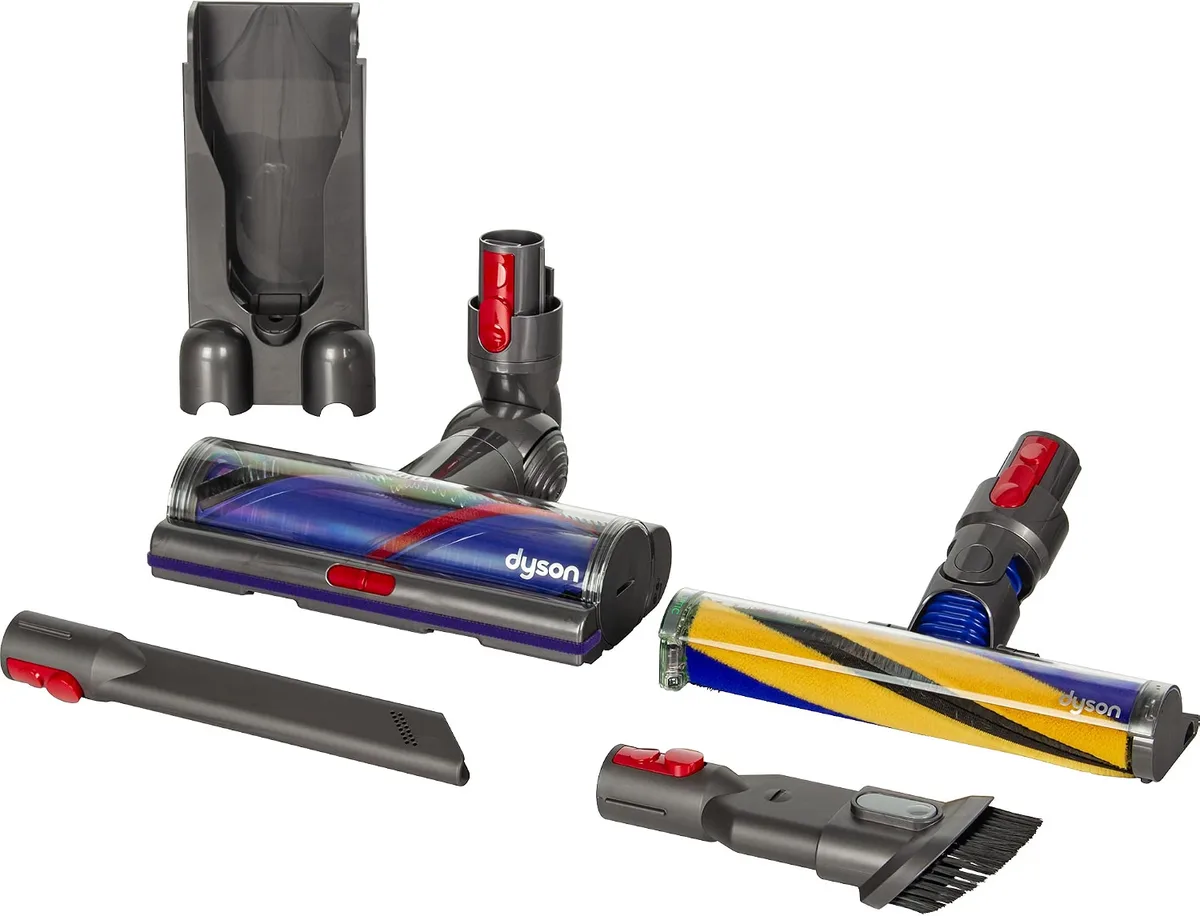
The soft roller for hard floors has a felt or fine nylon roller that captures fine dust. It gets visibly dirtier than a motorised head and can become matted.
- Every week: remove hair and threads, and brush the roller by hand to loosen it.
- Once a month: if the manual allows it, take out the roller and rinse it in cold water, without detergent, then let it dry completely, for at least 24 hours, before refitting. Never wet the part that contains the motor or the laser.
- The laser: gently wipe the laser window with a soft, dry cloth. A dusty window makes the beam less visible.
The tools
The tools (combination tool, crevice tool, mini motorised tool, spiral tool) collect dust and hair. Once a month, remove wrapped fibres, wipe them with a dry or damp cloth depending on their type, and check that their openings are not blocked. Tools without a motor can generally be rinsed in water, then dried completely. Those with a motor must never get wet.
The wand and blockages
A blockage in the wand is the most common cause of a sudden loss of suction. A tissue, a sock, a piece of cardboard or a clump of hair can get stuck in a bend or at the bin inlet.
- Detach the wand from the machine and from the head.
- Look through it, towards a light source.
- If something is blocking it, push it gently with a broom handle, never with a sharp object that would scratch the inside.
- Also check the bin inlet and the neck of the head, two other common blockage points.
- Wipe the seals at the ends of the wand, which keep it airtight.
The battery
The lithium-ion battery is the most expensive part of a stick vacuum. A few habits extend its life:
- store and charge the machine at room temperature, away from radiators, direct sunlight or a freezing garage;
- avoid leaving the battery completely flat for weeks;
- limit constant use of Boost mode, which puts heavy strain on it;
- only use the original charger;
- if you will not use the machine for a long time, store the battery partly charged, as many lithium-ion battery makers recommend.
The battery and machine contacts can be wiped with a dry cloth. Never take a battery apart, and stop using it if it is swollen, cracked or unusually hot: contact customer service. Our article battery, runtime and lifespan goes further.
The dock and the charger
From time to time, check that the charger cable is not pinched, sharply bent or damaged. Wipe the dock contacts with a dry cloth. If the machine no longer charges on the dock, try plugging the charger straight into the battery: this tells you whether the problem lies with the dock or with the charger.
The outside and the screen
Wipe the outside of the machine with a soft, slightly damp cloth, never a wet one, and without abrasive products or solvents. Clean the screen with a dry microfibre cloth. The vents on the main body must stay clear: a dry paintbrush removes the dust that settles there.
Bad smells
A vacuum that smells is almost always a sign of moisture or organic waste:
- A filter refitted while damp: remove it and let it dry completely.
- Food or litter residue in the bin or the cyclones: empty, clean, dry.
- A bin that is never cleaned: a monthly clean solves the problem.
- A head full of pet hair: take out the brush bar and clean it.
Do not add perfume or deodorising products to the bin or the filter: they can damage the filter and the motor. If you smell burning, stop the machine immediately, remove the battery and contact customer service.
The maintenance schedule
| Frequency | Task |
|---|---|
| After every session | Empty the bin; hang the machine back on its dock |
| Every week | Remove visible hair from the heads; check the wand inlet |
| Every month | Wash and dry the filter; take out and clean the brush bars; wipe the bin, mesh and cyclones; clean the tools |
| Every three months | Check the cable and the dock; wipe the contacts; check brush bar wear |
| As needed | Replace the filter, brush bars or battery |
With a pet or during moulting, double how often you empty the bin and check the heads. Our guide pet hair explains these adjustments.
Common faults and their solutions
| Symptom | Likely causes | Solutions |
|---|---|---|
| The machine pulses (stops and restarts) | Blockage in the wand, head or bin inlet; clogged filter | Check and clear; wash the filter |
| Loss of suction | Full bin, dirty filter, blocked wand, seal out of place | Empty, wash, clear, check the seals |
| The brush bar does not turn | Wrapped fibres, object stuck, head not clicked in | Remove the battery, take apart, clean, click back in |
| Runtime dropping | Use of Boost, clogged filter, cold, battery ageing | Switch to Auto, wash the filter, charge at room temperature; replace the battery if necessary |
| The machine does not charge | Dirty contacts, damaged cable, dock not plugged in properly | Clean the contacts, plug the charger in directly, check the socket |
| The laser does not come on | Head not clicked in properly, dirty window | Click the head back in, wipe the window |
| Unpleasant smell | Damp filter, organic waste | Dry the filter, clean the bin |
| Error message on screen | Appliance alert | Check the manual or the manufacturer’s support |
If the problem persists after these checks, contact the manufacturer’s customer service, especially during the guarantee period. Dyson quotes a 2-year guarantee on parts, labour and shipping for the V15 Detect.
Spare parts and repairs
A high-end stick vacuum should last. For it to last, wearing parts must be replaceable:
- The filter loses effectiveness after many washes: replace it if it is misshapen, torn or no longer returns to its original colour.
- The brush bars wear out: shortened bristles or matted felt reduce effectiveness.
- The battery loses capacity over its charge cycles. On the V15, it clicks in and can be replaced without tools.
- The tools can be bought separately.
Choose original parts or compatible parts of recognised quality, especially for the battery: a poor-quality battery can be a safety risk and may void the guarantee. Also check the manufacturer’s repair information when you buy, which tells you about parts availability and how easy the machine is to take apart.
Useful equipment
You do not need special tools to maintain a stick vacuum. A small kit kept near the dock is enough, and makes maintenance so quick that you no longer put it off:
- round-ended scissors, to cut wrapped hair without damaging the bristles;
- a paintbrush or soft-bristle brush, for the cyclones, the mesh and the vents;
- two microfibre cloths, one dry for the screen and the contacts, the other slightly damp for the outside and the bin;
- a coin, which unlocks the brush bar end cap on many models;
- a broom handle, to push a blockage through the wand without scratching it;
- a spare filter, if you vacuum every day, to alternate while one dries.
Avoid cotton buds that fray inside the openings, sharp metal objects, solvents and scented household products.
Adapting maintenance to your use
The schedule above suits average use: two to four sessions a week in a home with no particular constraints. Depending on your situation, some tasks should come round more often.
With a dog or cat
Hair fills the bin very quickly and clings to the cyclones. Empty it after every session, even if it has not reached the line. Check the brush bars every time during moulting, and wash the filter more often, for example every two to three weeks. Never vacuum damp litter or accidents: clean them up by hand first.
For allergy sufferers
The aim is to avoid releasing back into the air what the vacuum has captured. Empty the bin outdoors or into a sealed bag, consider wearing a mask to wash the filter, and if possible hand this task to someone who is not allergic. A clean filter maintains the filtration performance claimed by the manufacturer.
After building work
Plaster, cement or sanding dust is extremely fine. It passes through the cyclones and clogs the filter within minutes. A household stick vacuum is not designed for this kind of job: use a workshop vacuum for the bulk, then your stick for the finishing. If you have vacuumed building dust, wash the filter immediately and clean the cyclones thoroughly.
In a holiday home
A machine left unused for several weeks should be stored clean: bin emptied, filter dry, brush bars untangled. The battery is best stored partly charged, away from cold and heat. When you return, check that nothing has become damp before the first session.
With intensive daily use
A large family that vacuums every day puts more strain on every part. Two filters used alternately, a full weekly check of the brush bars and a clean of the bin every fortnight keep performance up. This is also where a second battery makes the most sense.
Dyson V15 Detect maintenance step by step
The V15 Detect was designed for tool-free maintenance. Here is the routine we recommend, to be adapted to the manual supplied with your machine, which is authoritative.
- After every session: hold the machine over the rubbish bin and push the bin down to open it. The mechanism scrapes the mesh and ejects the debris. Close it until it clicks.
- Every week: turn over the Digital Motorbar and the soft roller and remove visible fibres from the ends of the brush bars.
- Every month, the filter: twist off the filter at the back of the main body, tap it, rinse it in cold water without detergent until the water runs clear, then let it dry for at least 24 hours before twisting it back on.
- Every month, the brush bars: unlock the end cap of each brush bar, take it out, cut the wrapped fibres and wipe the housing. The soft roller can be rinsed as the manual describes; never the Digital Motorbar.
- Every month, the bin: unclip the bin as the manual describes, wipe the inside and the seal with a dry or damp cloth, and let it dry.
- Every month, the laser: wipe the laser window with a soft, dry cloth.
- From time to time: brush the cyclones with a dry paintbrush and wipe the screen and the battery contacts.
The V15 also displays maintenance alerts on screen, for example to signal a filter that is not fitted properly or a blockage. Take them seriously: they stop the motor working harder than it needs to. Our user guide completes this advice.
Maintenance mistakes to avoid
- Refitting a damp filter. This is the most common and most costly mistake: smell, mould, risk to the motor. Always wait until it is completely dry.
- Drying the filter on a radiator or with a hairdryer. Heat can warp the filter and damage the filter membrane.
- Using washing-up liquid or detergent. It leaves a film that clogs the filter’s pores and attracts dust.
- Getting the motorised head wet. It contains a motor and contacts: water can cause a permanent fault.
- Pulling wrapped hair without cutting it. This damages the bristles and puts strain on the bearings.
- Pushing a sharp object into the cyclones. You risk piercing or warping the cones, which reduces dust separation.
- Waiting for the machine to pulse before acting. Pulsing is a warning sign: at that stage, the motor is already working too hard.
- Ignoring a smell of burning or unusual heat. Stop the machine, remove the battery and contact customer service.
Storing the machine for a long time
For a house move, a long absence or a back-up machine, a few precautions avoid nasty surprises:
- Empty and clean the bin.
- Wash the filter and let it dry completely.
- Untangle and clean the brush bars.
- Store the battery partly charged, at room temperature, somewhere dry.
- Keep the machine and its tools away from dust, ideally in their original packaging.
- Before using it again, fully recharge the battery and check that everything is dry.
Maintenance and guarantee
The guarantee covers faults in the machine, not the consequences of neglected maintenance. A brush bar jammed with hair, a clogged filter or a motor damaged by a filter refitted while damp may be considered a matter of use. Following the manual therefore protects both the machine and your rights.
A few useful habits:
- keep the receipt and register the machine with the manufacturer;
- note the purchase date of the battery if you replace it;
- if there is a problem, describe the symptoms precisely and the checks you have already made: it speeds up the diagnosis;
- during the guarantee, do not open the machine beyond what the manual provides for.
Dyson quotes a 2-year guarantee on parts, labour and shipping for the V15 Detect. Your statutory rights against the seller also apply, whatever the manufacturer.
Signs that maintenance is due
Without waiting for the schedule, certain signs show that the machine needs attention:
- suction weakens, especially on rugs;
- the noise changes, becomes higher-pitched or whistles;
- the machine pulses or stops on its own;
- runtime drops suddenly from one session to the next;
- the head leaves traces of dust or hair behind it;
- a smell appears when you switch on;
- an alert appears on the screen.
In most cases, emptying the bin, washing the filter and cleaning the head are enough to put everything right. If the symptom persists after these three steps, refer to the table of faults above or contact customer service.
Getting into the habit of listening to your vacuum helps a great deal. A healthy machine makes a steady sound that changes slightly with the floor and the mode. A new whistle, a sudden rise in pitch or rapid changes in the noise almost always point to restricted airflow. Reacting straight away, by checking the wand, the head and the filter, stops the motor straining for weeks and preserves its lifespan as well as the battery’s.
Frequently asked questions
How often should I wash a stick vacuum’s filter?
As the manual says, generally at least once a month, more often with a pet. Let it dry completely, for at least 24 hours, before refitting it.
Can I wash the filter in the dishwasher?
No, unless the manual says otherwise. Rinsing in cold water, without detergent, is enough.
Why does my stick vacuum switch itself off?
Often because of a blockage or a clogged filter, which triggers the motor’s protection. Check the wand, the head, the bin inlet and the filter.
How do I clean a Dyson brush bar?
Remove the battery, take out the brush bar as the manual describes, remove the wrapped fibres, then refit it. Do not get the motorised head wet.
When should the battery be replaced?
When its runtime no longer covers your cleaning despite a well-maintained machine, or if the battery shows a defect (swelling, overheating). It can be replaced without tools on the V15.
How do I get rid of a bad smell?
Empty and clean the bin, wash and fully dry the filter, clean the head. Do not add perfume to the machine.
Do I need a second filter?
It is useful if you vacuum every day: you alternate while the other dries, and never refit a damp filter.
Can I rinse the bin with water?
Depending on your model’s manual. If it is allowed, let it dry completely before refitting.
How do I know if the filter needs replacing?
If it is misshapen, torn, or stays dark and suction does not come back after washing and drying it completely.
What should I do if the machine has fallen in water?
Do not switch it back on. Remove the battery, let it dry and contact customer service before using it again.
Can I use compressed air on the filter?
It is not recommended: compressed air can damage the filter membrane and blow fine dust back into the room. Tap it over the bin, then rinse it if the manual allows.
How long does a stick vacuum last with good maintenance?
Several years in normal household use. The battery is usually the first part to wear; on a model with a removable battery, replacing it gives the machine a new lease of life.
Cleaning you can finally see.
Laser · piezo sensor · up to 60 min in Eco · 0.76 L bin · 2-year guarantee. The price changes often on Amazon: check it, along with the seller, the exact version and the tools included, before you order.
Check the price on AmazonAffiliate link · new tab